이전 글 : 2. Object Registration - Deeping 다음 글 : 4. Scopes - 심화
- 비즈니스 Objects 관한 계층형 생명 주기 관리를 제공한다.
- 이것은
widget tree와는 독립적이다.
Scopes 란?
Scope: 등록 레이어의Stack등록 레이어: 의존성 주입 컨테이너 내에서 객체들이 관리되는 계층형 저장소.Stack처럼 작동- 새로운 스코프에 타입 등록 → 하위 스코프에 있는 동일한 타입을
shadowing - 이후 상위 스코프가 사라지면 다시 하위 스코프가 우선 순위를 가지게 됨.
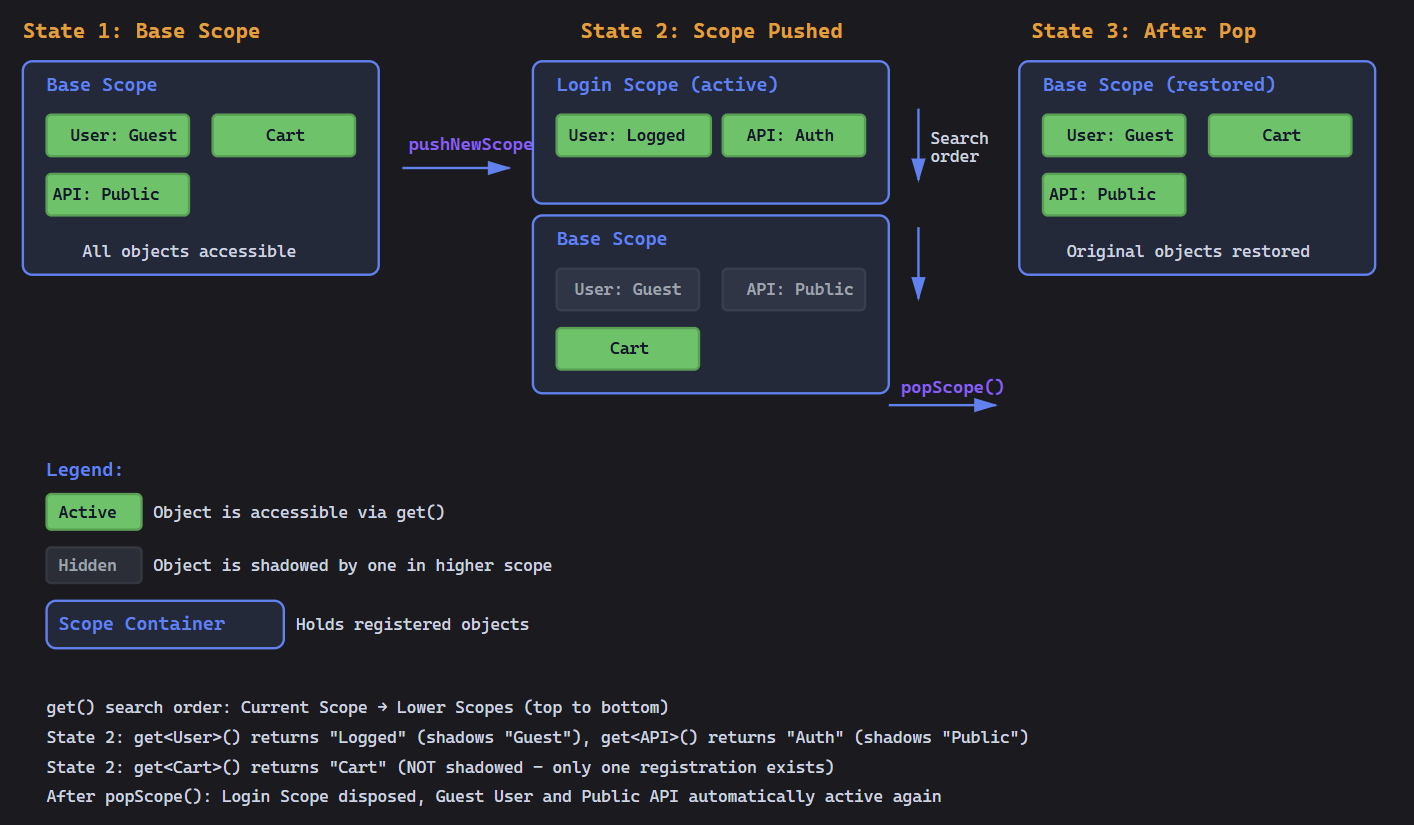
- 새로운 스코프에 타입 등록 → 하위 스코프에 있는 동일한 타입을
Shadowing 의 작동 예시
// Base scope -> 최하단
getIt.registerSingleton<User>(GuestUser());

// Push new scope -> 새로운 스코프 추가
getIt.pushNewScope(scopeName: 'logged-in');
getIt.registerSingleton<User>(LoggedInUser());

getIt<User>(); // Returns LoggedInUser (shadows GuestUser)

// Pop scope -> `logged-in` 스코프 제거
await getIt.popScope();

getIt<User>(); // Returns GuestUser (automatically restored)
Scope 를 사용해야 하는 경우
1. 인증 상태
void main() async {
  final token = 'auth_token_123';
  final user = GuestUser();

  // App startup - guest mode
  getIt.registerSingleton<User>(GuestUser());
  getIt.registerSingleton<Permissions>(GuestPermissions());

  // User logs in
  getIt.pushNewScope(scopeName: 'authenticated');
  getIt.registerSingleton<User>(AuthenticatedUser(token));
  getIt.registerSingleton<Permissions>(UserPermissions(user));

  // User logs out - automatic cleanup
  await getIt.popScope(); // GuestUser & GuestPermissions restored
}
2. 세션 관리
// Start new shopping session
getIt.pushNewScope(scopeName: 'session');
getIt.registerSingleton<ShoppingCart>(ShoppingCart());
getIt.registerSingleton<SessionAnalytics>(SessionAnalytics());

// End session - cart discarded, analytics sent
await getIt.popScope();
3. Feature Flags / A-B Testing
const featureFlagEnabled = true;

// Setup base scope with original checkout
final userService = await UserService.load();
getIt.registerSingleton<CheckoutService>(CheckoutService(userService));

if (featureFlagEnabled) {
  getIt.pushNewScope(scopeName: 'feature-new-checkout');
  getIt.registerSingleton<CheckoutService>(NewCheckoutService(userService));
} else {
  // Uses base scope's original CheckoutService
}
4. 테스트 격리
setUp(() {
  configureDependencies(); // Call your real DI setup

  getIt.pushNewScope(); // Shadow specific services with mocks
  getIt.registerSingleton<ApiClient>(MockApiClient());
  getIt.registerSingleton<Database>(MockDatabase());
});

tearDown(() async {
  await getIt.popScope(); // Remove mocks, clean slate for next test
});
Creating and Managing Scopes
Scope의 기본 동작
**A. 새로운 스코프 Push
  getIt.pushNewScope(
    scopeName: 'my-scope', // Optional: name for later reference
    init: (getIt) {
      // Register objects immediately
      getIt.registerSingleton<Service>(ServiceImpl());
    },
    dispose: () {
      // Cleanup when scope pops (called before object disposal)
      print('Scope cleanup');
    },
  );
B. Scope Pop
  await getIt.popScope();
// Pop multiple scopes to a named one
  await getIt.popScopesTill('my-scope', inclusive: true);
C. dropScope
await getIt.dropScope('my-scope');D. 스코프가 존재하는지 확인
  if (getIt.hasScope('session')) {
    // ...
  }
**E. 현재 Scope 이름 출력
기본 Scope에 대해서는 null 반환
  print(getIt
      .currentScopeName); // Returns null for base scope, 'baseScope' for base
Async Scope Initialization
scope설정을 할 때 비동기 작업이 필요한 경우(설정 파일 로딩,connection구성)
const tenantId = 'tenant-123';

await getIt.pushNewScopeAsync(
  scopeName: 'tenant-workspace',
  init: (getIt) async {
    // Load tenant configuration from file/database
    final config = await loadTenantConfig(tenantId);
    getIt.registerSingleton<TenantConfig>(config);

    // Establish database connection
    final dbConnection = DatabaseConnection();
    await dbConnection.connect();
    getIt.registerSingleton<DatabaseConnection>(dbConnection);

    // Load cached data
    final cache = CacheManager();
    await cache.initialize(tenantId);
    getIt.registerSingleton<CacheManager>(cache);
  },
  dispose: () async {
    // Close connections
    await getIt<DatabaseConnection>().close();
    await getIt<CacheManager>().flush();
  },
);